Widgetry / Weather Window
Weather Window, your real weather through a window on the XENEON EDGE
Some nights you just want to watch the rain.
Weather Window turns your Edge into a window with your real local weather outside it. When it rains where you are, drops bead up on the glass and run down. When it snows, flakes drift past and pile up on the ledge. As the sun goes down, the view moves to dusk and then night on your own clock.
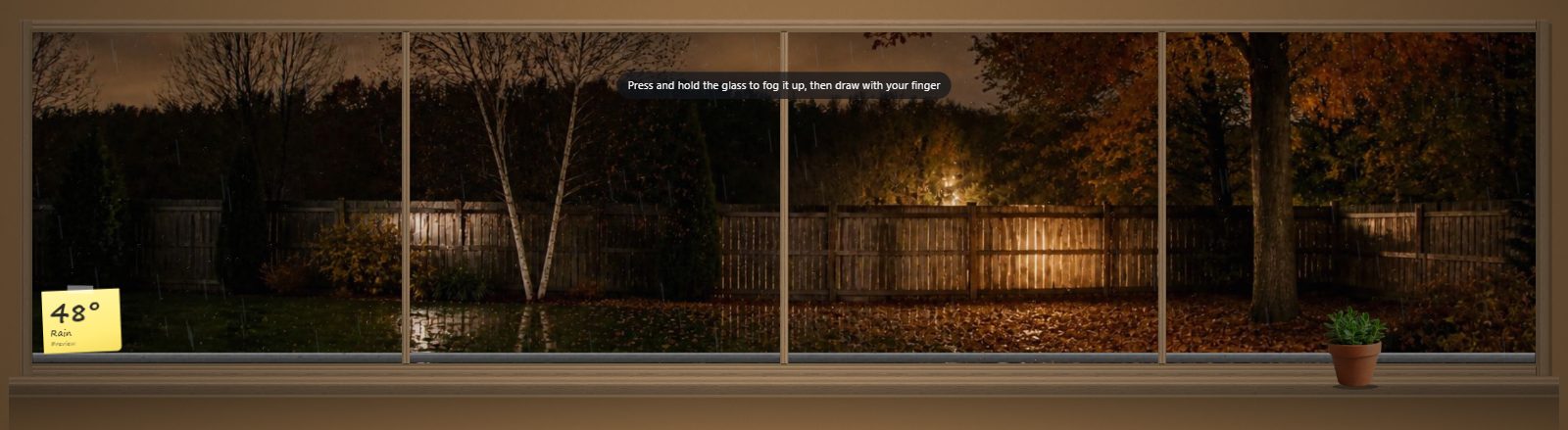
Showing rain so you can see the glass at work. Press and hold to fog it up, then draw in it.

Setup guide: three steps, about a minute.
Three views
- Backyard. A wooden fence and fall trees
- City Apartment. Looking out at the skyline
- Mountain Cabin. Facing the peaks
Each view has seven photo looks (dawn, day, dusk, night, snow, rainy day and rainy night) that change on their own with the weather and the hour. Frame it in painted white, warm wood or matte black.
Touch the glass
- Press and hold to fog it up, then draw in it with your finger. It slowly fogs back over.
- Below freezing, frost creeps in from the corners
- A sticky note shows the temperature and conditions. Tap it for the next few hours.
Fall asleep to it
- Rain on the window, rain on a tin roof, or both, with wind and thunder when a storm rolls through
- The sound is long and drifts on its own, so you won't hear an obvious loop
- A sleep timer for 30 minutes, 1 hour or 2 hours fades it out slowly
- iCUE needs one tap on the widget before it can play sound
Slot sizes
All four sizes, both orientations. See every slot's pixel size in the XENEON EDGE slot size guide.
Requirements and privacy
CORSAIR XENEON EDGE with iCUE 5.47 or later on Windows. An internet connection for live weather. Speakers or headphones for the optional sounds.
Sends latitude and longitude to api.open-meteo.com for the forecast, and the city name you type to Open-Meteo's geocoding service to find it. When Location is left on auto, it asks api.ipregistry.co (with the key iCUE provides), get.geojs.io or ipwho.is for an approximate position based on your IP address. No account or API key is required. No analytics, no telemetry, and your settings stay on your PC.
Questions
Where do I get Weather Window?
On the Elgato Marketplace. Use the button on this page.
Does it show my real weather?
Yes. It finds your location on its own, or you can type a city or coordinates. You can also pick the weather yourself, like rain or snow, whenever you want it.
Why is there no sound at first?
iCUE needs one tap on the widget before it can play sound.
Do I need an account or an API key?
No.
How do I add it to my XENEON EDGE?
Get it on the Elgato Marketplace. Then in iCUE, open XENEON EDGE, pick the widget in the Widgets panel and choose the slot size. Its settings appear right next to it.