Widgetry / Skycast Weather
Skycast Weather, a free weather widget for the XENEON EDGE
The forecast, with the real sky behind it.
The sun and moon sit where they actually are right now, and the clouds match the cloud cover outside. When it's raining where you live, it's raining on your Edge. Snow, fog and lightning show up the same way. Slide a finger along the hourly curve and the sky changes to that hour's weather, then let go and it comes back to now.
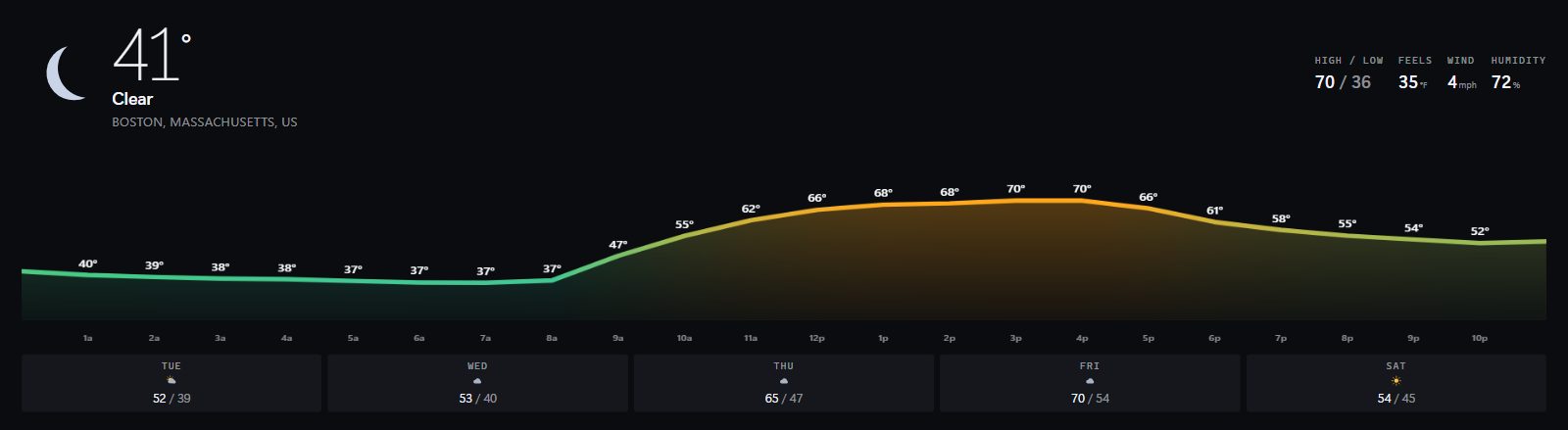
Running live for Boston. Drag along the curve and the sky changes.

Setup guide: three steps, about a minute.
What's on screen
- Current temperature and conditions, high and low, feels like, wind and humidity
- An hourly temperature curve across the full width, with the chance of rain
- The next five days underneath
Severe weather alerts
- When the National Weather Service issues a warning for your area, a banner goes up and the edges of the screen pulse red. Alerts cover US locations only.
Make it yours
- Fahrenheit or Celsius, and wind in mph, km/h, m/s or knots
- Your own text and accent colors
- A solid background if you'd rather not have the sky
- Type a ZIP code or a city, or leave Location blank and it finds you
Slot sizes
All four sizes, both orientations. See every slot's pixel size in the XENEON EDGE slot size guide.
Requirements and privacy
CORSAIR XENEON EDGE with iCUE 5.47 or later on Windows. An internet connection for forecast updates. The last forecast stays on screen when the connection drops.
Sends latitude and longitude to api.open-meteo.com for the forecast and to api.weather.gov for active severe weather alerts. When you type a US ZIP code it asks api.zippopotam.us where that ZIP is. When Location is left blank, it asks api.ipregistry.co (with the key iCUE provides) or get.geojs.io for an approximate position based on your IP address. No analytics, no telemetry, and nothing is stored off your PC.
Questions
Where do I get Skycast Weather?
On the Elgato Marketplace, free. Use the button on this page.
Is it really free?
Yes. No account and no API key.
Do the severe weather alerts work outside the US?
No. They come from the US National Weather Service, so they cover US locations only.
What happens if my connection drops?
The last forecast stays on screen.
How do I add it to my XENEON EDGE?
Get it on the Elgato Marketplace. Then in iCUE, open XENEON EDGE, pick the widget in the Widgets panel and choose the slot size. Its settings appear right next to it.